Guide
Dashboards That Matter: What to Check Weekly for AEO Performance
Learn which AEO dashboard metrics Shopify merchants should monitor weekly to turn AI referral data into real growth. Focus on actionable signals, not noise.
If your Shopify store is investing in Answer Engine Optimization (AEO), you already know that being visible to AI shopping agents and large-language-model search is crucial to organic growth in 2024. But are you actually tracking the right signals? Many merchants focus on raw traffic or simplistic conversion numbers, but to truly optimize for AI referrals, your analytics dashboard should surface exactly the metrics that matter—clear, actionable, and easy to check weekly.
Let’s dig into what separates a noise-filled analytics dashboard from one that delivers meaningful insights for AEO, and why focusing on these metrics makes the difference between guesswork and confident growth.
Why Specialized Dashboards Matter for AEO
Traditional analytics stacks—think Google Analytics, Shopify’s default dashboards, or generic UTM-based views—weren’t built with AI referrals in mind. AI agents like ChatGPT or Perplexity generate traffic differently than humans; they might deep-link to product pages, bundle questions and comparison queries, or generate multiple hits from a single user-initiated prompt. Without a focused dashboard, you’ll miss crucial referral patterns or, worse, attribute sales to the wrong sources.
That’s where AI-Referral Attribution comes in. AEO-focused dashboards let you drill down by agent, intent, and referrer with far more granularity—empowering you to optimize your content, product feeds, and technical implementation based on real AI agent performance.
What Metrics Belong on Your Weekly AEO Dashboard?
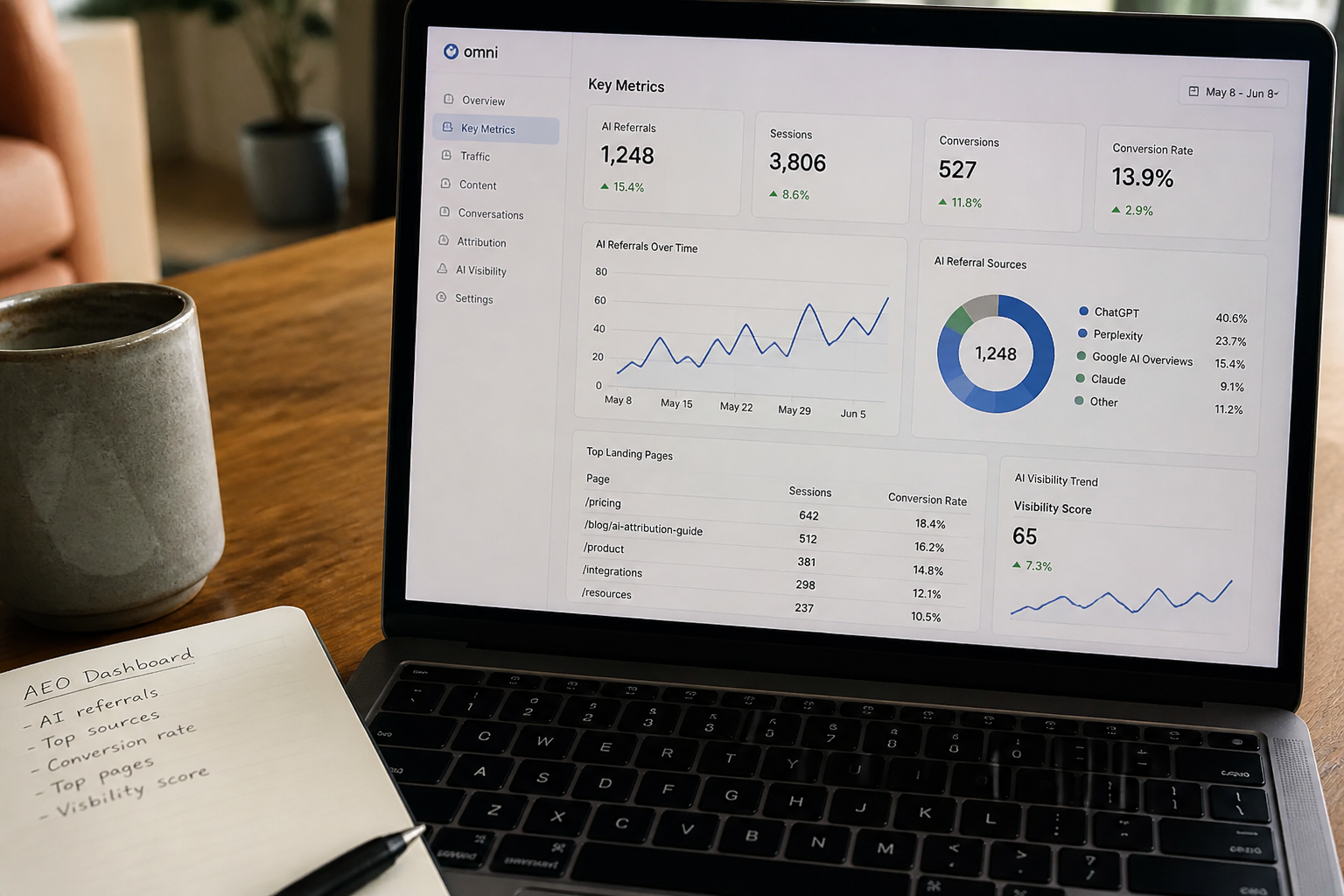
When you check your AEO dashboard each week, prioritize these five dimensions to get the clearest picture of "what’s working" and "where to double down":
- AI Referral Traffic by Source: Break out sessions and pageviews explicitly from AI agents (ChatGPT, Perplexity, Gemini, Microsoft Copilot, etc.). This shows which engines are surfacing your site most often.
- Conversion Rate for AI Referral Traffic: A high number of visits is meaningless if the conversion rate lags far behind human-initiated sessions. Compare this side-by-side each week. You might find ChatGPT traffic converts 2x better than others.
- Order Value & Product Affinity: Which products, categories, or price points perform best via AI referrals? If certain SKUs are more often cited by bots, consider adjusting merchandising or content to emphasize those items.
- Referral Quality Signals: AI-driven sessions can be tricky to classify. Use bot detection filters to weed out non-genuine traffic—see Spotting Bot Traffic vs. Genuine AI-Agent Referrals for a detailed walkthrough. Your dashboard should make quality signals obvious (eg. engagement thresholds, known real AI-agent user agents, referral URLs).
- Attribution Path Analysis: Track the journey from AI agent discovery to completed checkout (look for datasets capturing AI-generated referrals as the first or assisting touchpoint). This clarifies whether AI is driving discovery, mid-funnel consideration, or final conversion.
Implementation: Getting These Metrics in Your Dashboard
Shopify’s core reporting isn’t yet designed for AEO. The fastest way to implement these metrics is an app like OtoRank, which leverages custom tracking, event capture, and AI-agent fingerprinting. You’ll want to:
- Instrument server-side tracking for LLM-crawler activity (use
user-agentand header inspection). - Layer on event-based attribution, assigning conversion assists/credits to AI referrals even if the session jumps between devices or browsers.
- Map deep links and AI-suggested URLs to your product catalog, so you understand what specific answers or queries led to purchases.
For practical advice on implementing granular tracking, follow our guide: How to Track Orders Referred by ChatGPT, Perplexity, and AI Shopping Agents. Setting this up takes a bit of up-front work, but pays rapid dividends in visibility and actionable data.
What Not to Obsess Over (Common Reporting Pitfalls)
Avoid dashboards bloated with metrics that are disconnected from actionable AEO feedback. Excessive focus on vanity metrics—like raw pageviews, bounce rates, or "average session duration"—can disguise what you’re actually trying to achieve. For AI referrals, not all sessions represent qualified buyers, and traditional engagement numbers may be skewed by how AI agents test or scrape your site.
Another pitfall: conflating automated bot traffic with real AI-agent suggestions. False positives here can balloon your metrics and misguide your content strategy. Again, refer to our checklist on spotting bot vs. genuine AI-agent referrals for a reliable filtering strategy.
Bringing Weekly AEO Tracking Into Your Workflow
To maximize impact, bake AEO dashboard reviews into your weekly operating rhythm—just like inventory, ad spend, or regular conversion rate checks. Consistently reviewing these targeted metrics makes it easier to spot both quick wins ("Perplexity just started surfacing my bestsellers last week!") and slow-burning issues ("My conversion rate from Copilot referrals is dropping—why?").
And as your needs evolve, consider how you can further embed AEO tracking into your team’s workflow. Shopify merchants who use App Bridge and the Embedded Admin Experience report smoother, more contextual reviews, as key metrics show up right alongside other business-critical data—instead of getting lost in another analytics login.
Conclusion: Actionable Monitoring is the AEO Advantage
The growth curve for AI-driven e-commerce is steep, but only if you’re tracking success with accuracy and intent. With dashboards focused on AI referrals, conversion, product affinity, and quality control, Shopify merchants can unlock new growth—doubling down on content and products that are already winning in the age of answer engines.
Make your dashboard work for you, not the other way around—and check it weekly, so you catch every AI-powered opportunity as it arrives.
Frequently asked questions
What are the most important metrics on an AEO dashboard?
Focus on AI referral traffic by source, conversion rate for AI sessions, order value and product affinity from referral traffic, engagement quality signals, and attribution path analysis. These provide actionable feedback on how AI agents are driving real revenue.
How can I tell if traffic is from an AI agent or a bot?
Use server-side tracking to inspect user-agent strings and headers, and cross-reference with known AI shopping agent lists. Filter out generic bots by looking for repeat, non-engaged, or nonhuman patterns. See our full guide on distinguishing genuine AI-agent referrals.
How often should I review my AEO performance?
Ideally, check your AEO metrics weekly. This helps you spot emerging trends—like spikes in traffic from new AI agents—faster, and lets you act on content, product, or technical opportunities before competitors.
Do I need a third-party app to track AI referrals on Shopify?
Shopify’s native reporting tools aren’t tailored for AEO out-of-the-box. To get granular tracking of AI shopping agent referrals and intelligent attribution, an app like OtoRank is recommended for automated and accurate reporting.
Why separate AI referral data from traditional traffic analytics?
AI-generated traffic behaves differently than human sessions. Without isolating AI referral data, you risk misattributing sales, misunderstanding engagement, and missing what’s working with answer engine optimization.
Related reading
Check your own store's AEO score
No login, no email, just a score and what to fix first.