Guide
How to Track Orders Referred by ChatGPT, Perplexity, and AI Shopping Agents
AI shopping agents are reshaping ecommerce referrals, but tracking their impact isn't straightforward. Here’s how Shopify stores can reliably attribute orders from ChatGPT, Perplexity, and more.
Why Tracking AI Referrals Is No Longer Optional
Shopify store owners are well-versed in tracking traffic from Google, Instagram, and affiliates. But a new class of referrer has quietly exploded: AI-powered assistants like ChatGPT, Perplexity, and shopping agents such as Klarna's AI or Google’s Shopping Graph. These tools now drive thousands—even millions—of product recommendations every day. Merchants who can attribute orders to these sources will understand what’s really working (and what isn’t) in this new landscape. But unlike traditional web referrals, AI agents are tricky: they might not send clear UTM tags or use recognizable referral headers.
If you want to master AI-referral attribution, you’ll need to rethink your tracking stack. Let’s break down the strategies that actually work, show the pitfalls to avoid, and reveal how Shopify stores are closing the attribution gap for AI referrals.
How AI Agents Refer Traffic (and Why It’s Complicated)
Traditional referral tracking relies on UTM parameters and the document.referrer header. But AI shopping agents operate differently. For example, when a shopper uses ChatGPT’s Browse with Bing, Perplexity’s Copilot, or a browser-integrated agent, they might:
- Visit your site via a raw link with no UTM tags or recognizable referrer
- Handoff the URL to a native browser (mobile or desktop) that sets the referrer to
null - Open product links in-app, generating fragmented or anonymized referral data
- Embed links via AI-written emails or summary popups—further obscuring source
This means that your default analytics dashboards may either bucket these visits as "Direct" or misclassify them entirely. The spike in so-called "direct" traffic could be coming from AI engines—and you might have no idea.
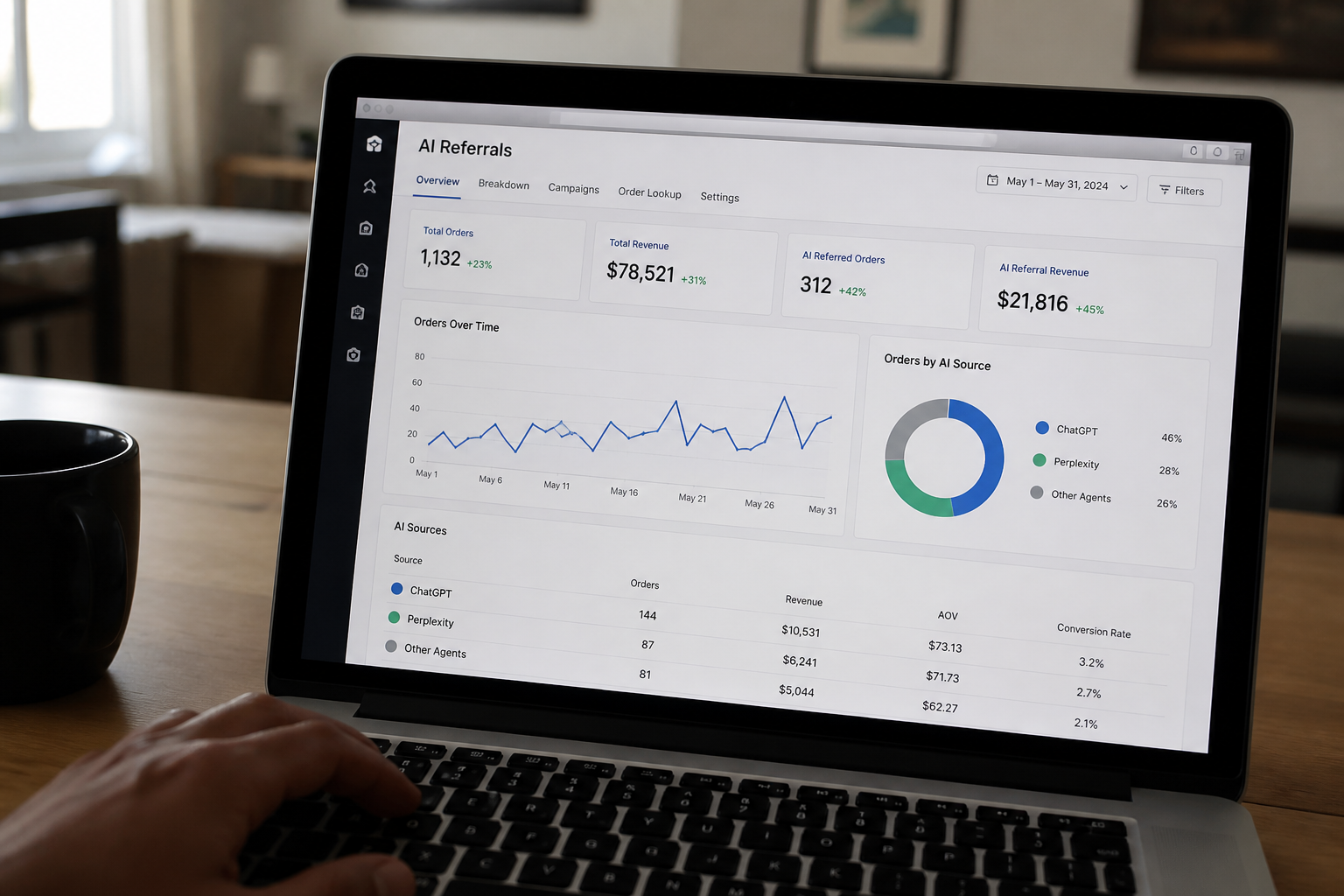
Step-by-Step: Tracking Orders from ChatGPT, Perplexity, and AI Agents
Since AI agent traffic can defy legacy tracking, the best attribution requires multiple techniques working in tandem. Here’s how smart merchants are building a reliable pipeline:
- 1. Instrument Your Store with a Flexible Web Pixel. Install a customizable pixel or snippet that can capture “invisible” traffic clues—like navigation patterns, browsing speed, and (where available) device user agents. Not sure where to start? See our full walkthrough on setting up a web pixel to capture AI referral traffic.
- 2. Monitor for AI-Specific User Agents and IP Patterns. Some AI browsers (or their proxies) stamp unique headers, user agents (e.g.,
Mozilla/5.0 (AI-bot)), or use predictable blocks of IP addresses—especially in early-stage or test deployments. Logging these can correlate traffic surges with AI engine updates. - 3. Leverage Landing Page Logic and Advanced URL Fingerprinting. If you suspect a product is often linked by Perplexity or ChatGPT, monitor first-page activity: e.g., what landing pages are seeing new direct spikes, and how do those users behave versus typical search traffic? Fine-grained attribution tools can analyze click paths, engagement time, and geographic concentration to surface non-human or AI-referred patterns.
- 4. Collaborate with AI Platforms—When Possible. As AI engines mature, some are piloting affiliate-like programs. Early adopter brands have successfully requested that ChatGPT or Perplexity append unique identifiers (think
?ref=chatgpt) to links—allowing precise tracking via Shopify’s order source reports.
Most Shopify merchants today use a blend of these approaches, customizing analytics dashboards to spotlight surges in "direct" product traffic and layering in signals from web pixels or server logs.
What About Shopify Analytics and Third-Party Apps?
Unfortunately, Shopify’s native analytics still falls short when attributing order sources from chatbots and generative AI tools. While you can view "direct" versus "social" or "search," the bulk of AI-engine traffic typically ends up labeled as direct—blurring what’s truly organic, returning, or AI-referred.
Tools like OtoRank are emerging to bridge this gap, layering AEO-specific (AI Engine Optimization) metrics atop your Shopify dashboard. For a refresher on why AEO matters for merchant visibility in AI search and conversation results, check out our introduction to AEO for Shopify stores.
If you want to monitor AI-powered results every week, review our guide to dashboards that matter for AEO performance—it highlights which metrics actually flag increases in AI-driven sales.
Practical Attribution Example: Spotting a ChatGPT-Driven Sales Spike
A real Shopify merchant noticed a sudden spike in direct traffic to their flagship product page. There was no accompanying rise in paid ads or social activity. Digging deeper with a combination of web pixel tracking and traffic logs, they correlated a) unusually fast, direct visits to the page, b) a cluster of new customers from browsers reporting a generic user agent, and c) a matching spike in Google Trends for “best gifts for plant lovers”—a phrase trending on Perplexity and ChatGPT prompts.
This merchant set up custom dimensions in their reporting dashboard—flagging visitor sessions matching these patterns as “suspected AI referral.” Over the next quarter, they could reliably attribute 8% of new customer sales to referrals originating from generative AI answers or chat-based agents. Without this layered approach, those sales would’ve been lost in the noise of "direct" traffic.
Looking Ahead: The Future of AI Referral Attribution
Attribution will only get trickier: AI agents will become more integrated into search, browser, and shopping platforms, further blurring traditional tracking lines. Merchants who proactively build their AI-referral attribution toolkit can identify new growth levers before their competitors—or lost sales become invisible.
If you want to stay ahead in the AI shopping revolution, you can’t afford to ignore these invisible referrals. The best time to start tracking them is now.
Frequently asked questions
Why doesn’t Shopify’s default analytics attribute orders from ChatGPT or Perplexity?
AI agents often send visitors with missing or generic referral data, causing Shopify’s analytics to bucket these orders as 'Direct' traffic instead of attributing them to their true AI sources.
How can I identify traffic coming from AI agents if there are no UTM tags?
Use web pixels to capture behavioral signals, monitor logs for unique user agents or IP ranges, and analyze surges in direct visits or landing page activity that match AI-driven trends.
Are there tools to help automate AI-referral attribution?
Yes, some tools like OtoRank are designed to add AEO-focused metrics and tracking for AI-driven traffic, supplementing Shopify’s native reporting with actionable attribution insights.
Can I ask AI platforms to add tracking parameters to their links?
In some cases, yes—early adopter brands have secured unique tracking identifiers (like a custom ref parameter) for links shared by ChatGPT or Perplexity, enabling direct source attribution.
Related reading
Check your own store's AEO score
No login, no email, just a score and what to fix first.